How to Chop Samples on an MPC: Step by Step (2026)
This article contains affiliate links. If you buy through them, GUIO Records may earn a small commission at no extra cost to you. As an Amazon Associate I earn from qualifying purchases. Outside the US, Amazon links open your local Amazon store (UK, Canada, Germany, France, Italy, Spain, Netherlands, Poland or Sweden).
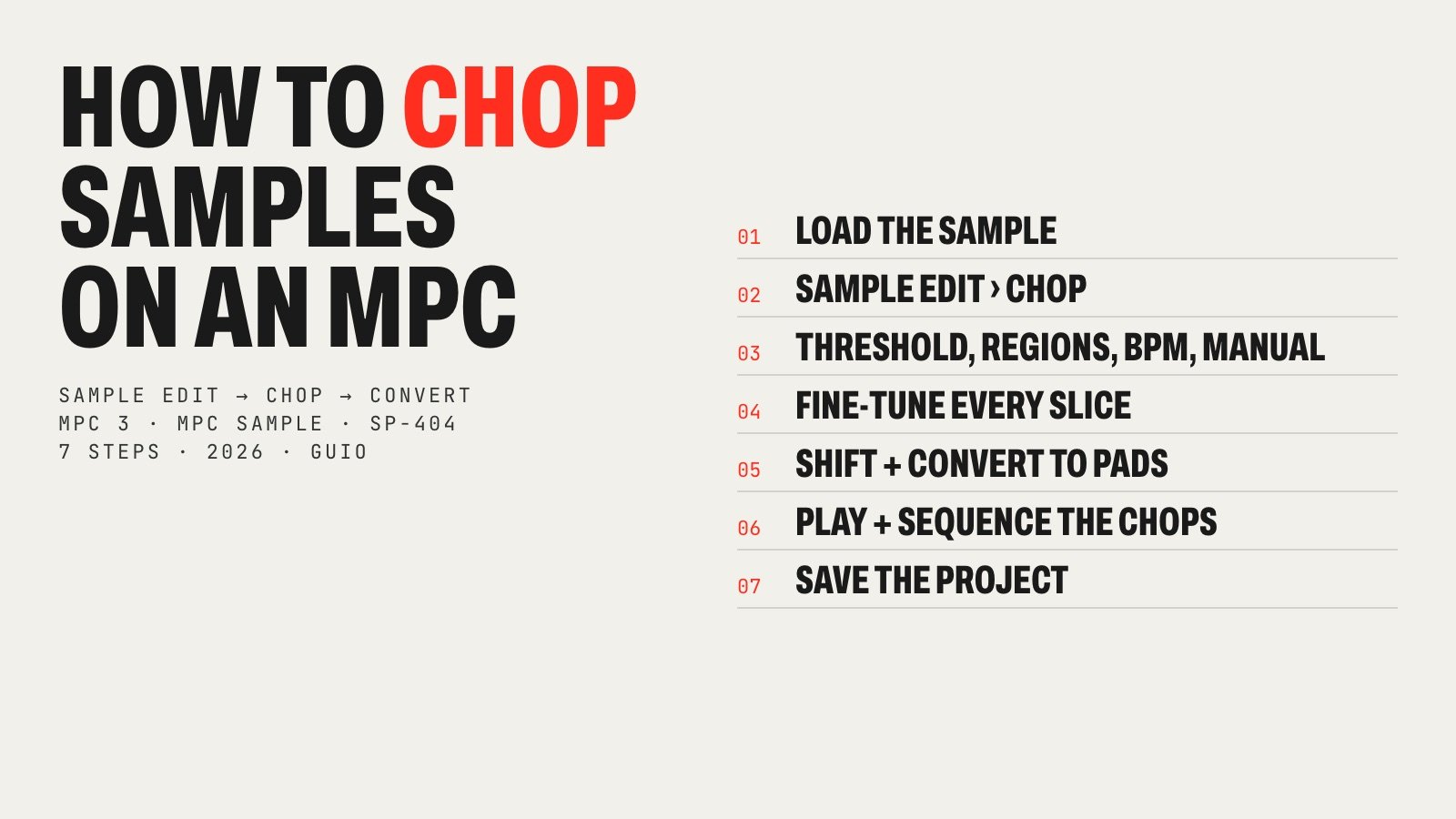
Chopping is where a sample stops being someone else’s record and turns into your beat. On an MPC it takes a minute once you know where everything is: one screen to slice, one window to send the chops to pads. Here is the whole process, step by step, for every current MPC, plus the MPC Sample and the SP-404 MKII.
How this guide was made: I make my beats on an MPC Live III and chop samples on it every day, so the workflow and the tips come from use. The exact button names come from Akai’s official MPC 3 user guide (v3.4), the MPC Sample user guide and Roland’s SP-404MKII reference manual, all linked at the end. Menus can move slightly between software versions.
What “chopping” a sample means
Chopping is cutting a sample into pieces (slices, or chops) and putting each piece on its own pad, so you can play them in a new order, at a new rhythm, and build something that was not in the record. A drum break becomes a kit; a soul intro becomes four chords you can rearrange. It is the technique behind most sample-based hip hop, from the SP-1200 and MPC60 era to today.
The difference with trimming: Trim Mode only cuts the start and end of one sample. Chop Mode divides it into many slices. Akai recommends Chop Mode for long samples with different sounds inside, like a drum loop or a melodic passage.
If you still need to get the sound in, start with our guide on how to sample vinyl into an MPC or a DAW. This guide picks up where that one ends.
Where to buyAkai MPC Live III
Step 1. Load the sample
Get the sample into the project. Either record it in the Sampler, or open the Browser, find the file and tap Load (with a pad selected in a drum track, it goes straight onto that pad) or Load to Pool to add it to the project’s sample pool. The loop does not have to match your project tempo yet.
Before you chop, trim the obvious silence at the start in Trim Mode. A clean first transient makes every chop type work better.
Step 2. Open Sample Edit and switch to Chop
- Press Menu and tap Sample Edit. Shortcuts: the Sample Edit button on the MPC X, One, Key 61 and Key 37; Shift + Mute/Sample Edit on the MPC Live II.
- Tap the Sample field at the top and pick your sample with the data dial (or double-tap it for a list).
- Tap the Trim/Chop tab in the lower-left corner so it says Chop.
Each slice is mapped to a pad automatically: pad A01 plays slice 1, A02 plays slice 2 and so on. If there are more than 16 slices, the rest go to the next pad banks.
Step 3. Choose a chop type: Threshold, Regions, BPM or Manual
The selector in the lower-left corner sets how the MPC cuts the sample. Akai’s manual describes four methods:
| Chop type | What it does | Use it for |
|---|---|---|
| Threshold | Places a slice at every transient louder than the Threshold value. Min Time sets the shortest slice | Drum breaks, stabs, anything with clear hits |
| Regions | Divides the sample into equal slices (you set how many) | A clean loop you want split evenly, like 8 or 16 parts |
| BPM | Slices on the beat grid: Bars, Beats per bar and Time Div (1/4, 1/8, 1/16, 1/32) | Loops already at a known length; Akai suggests 1/16 in most cases |
| Manual | You add slices: tap Slice+ or press pads while the sample plays | Soul, jazz and melodic samples, where the best chop is a musical choice |
Threshold: for drum breaks
Tap Threshold, then set the Threshold value with the data dial. Akai’s quick-start chapter says the lower the threshold, the more slices you get, and to pick a value where every transient (kick, snare, hat) has its own marker. Use Min Time to stop the MPC from cutting tiny slices on ghost notes and crackle.
BPM: for loops on the grid
Set Bars (how long the loop is), Beats per bar and Time Div. Two bars of 4/4 at 1/8 gives you 16 slices, exactly one pad bank; at 1/16 you get 32. This is the fastest way to chop a loop you plan to rearrange on the beat.
Regions: equal slices
Set how many Regions you want and the MPC splits the sample into equal pieces. Same idea as BPM, without thinking in bars.
Manual: for soul and jazz samples
Press an unlit pad (usually pad 1) to start playback, then press other unlit pads while it plays: each press drops a slice marker. You can also tap Slice+ at the playhead, or set the cue playhead and tap Slice+ there. This is the one I use most for melodic samples: the best chop in a soul record is a musical decision (where a chord lands, where the singer breathes), and no detection algorithm hears that.

Step 4. Fine-tune every slice
Automatic chops are a starting point. Go through them pad by pad:
- Listen: press each pad. Turn One Shot on (Shift + One Shot) to hear the whole slice with one hit, or off to hear it only while you hold the pad.
- Move the markers: select a slice with the Slice field and drag its start (S) and end (E) markers, or turn the Start and End Q-Link knobs on models that have them. Zoom in on the attack.
- Avoid clicks: Shift + 0 Snap forces start and end points onto zero-crossings.
- Split or combine: the glue-and-scissors icon splits the current slice in two or joins it with the one before.
- Link Slices: on, moving one slice’s start also moves the previous slice’s end. Turn it off to make overlapping or non-contiguous slices, for example the same chord with and without the vocal.
- Start again: Shift + Clear All removes every slice.
Producer tip: start each chop a hair before the transient, not on it. A slice that starts late loses the attack and sounds soft in the beat.
Step 5. Convert the chops to a drum track
Hold Shift and tap Convert to open the Convert or Assign Slices window. Choose one of these in Convert To and tap Do It:
- New drum track using slices. Creates a drum track (named after the sample with “ch” added) whose pads point to the slices of the original sample. No new files, so the project stays tidy. Slice Type: Non-Destructive Slice (each pad plays slice 1, 2, 3…) or Pad Parameters (each pad gets its own start and end). Akai’s support article uses this option.
- Create New Samples. Makes a new sample from every slice (named SI-1, SI-2…) on a new track. Crop Samples deletes the unused audio from the new samples; the original stays in the project.
- Audio Track from Samples. Lays the chops on an audio track, with Warp Events to fit them to the project tempo.
- Assign Slice to Pad or New Sample to Pad. Sends only the current slice to the pad you choose.
- Patched phrase. One sample that follows the project tempo, set by bars.
Tick Create Events and set Bars if you want the MPC to write a sequence that plays the slices in order. Press Play: the loop now follows your tempo, and you can quantize or rearrange those notes. Leave it off when you want a blank sequence to play your own pattern.

Step 6. Play and sequence the chops
Go back to Main, pick the new track and play the pads. This is where the beat happens:
- Rearrange. Record the chops in a new order: a chord from the intro, the bass note from the bridge, a vocal stab from the hook.
- Mute group. In Track Edit, put the melodic chops in the same mute group so each pad cuts off the one before. That is the classic choppy MPC feel, and it stops long slices from piling up.
- Tune, filter, reverse. In Track Edit each pad has its own tuning (Semi), filter and Rev. Filtering the low end out of a chop leaves room for your kick and bass.
- Slice Motion. When a pad plays a slice, Akai’s MPC 3.9 guide adds a Motion field: Increment plays the next slice on every hit and Random picks one at random. Hold the pad with Note Repeat for instant variations.
- Swing and timing. Quantize with Timing Correct, then add swing to taste. Chops played slightly off the grid are part of the sound, so do not over-quantize.

Step 7. Save the whole project
Save with Menu › Save › Project. Akai’s support article recommends saving the whole project so all the samples come with it. Convert your chops before you save, so the slices live on a track and not only as markers. If you want a slice as its own file for another project, convert it with Create New Samples or use the Extract process (Shift + Process) in Chop Mode.
Example: chopping a two-bar soul loop
Here is how a typical sample-based beat starts on my Live III, from a two-bar soul loop sampled off a record:
- Trim the loop so it starts exactly on the downbeat.
- Chop with BPM: 2 bars, 4 beats, Time Div 1/8. That gives 16 slices, one per pad.
- Play the pads and find the four or five chops that sound good alone: a clean chord, a horn hit, a drum-free bass note.
- Switch to Manual (editing a slice does that automatically) and move those markers to the exact musical points. Delete the rest.
- Shift + Convert › New drum track using slices, without Create Events.
- Set the pads in one mute group, pitch the main chop down a couple of semitones if it needs weight, and filter the lows.
- Play a new four-bar pattern with the chops over a drum break, add swing and record it.
Ten minutes, and the loop is something new. If you want to hear where this method comes from, the masters are worth studying: J Dilla’s Donuts, The Low End Theory, or one record flipped many ways in our breakdown of the Bob James “Nautilus” sample.
How to chop samples on each MPC (and the SP-404 MKII)
| Machine | Where you chop | Chop options | How slices reach the pads |
|---|---|---|---|
| MPC Live III · MPC XL · MPC One G2 · MPC Key 37 G2 (MPC 3) | Menu › Sample Edit › Chop | Threshold, Regions, BPM, Manual | Shift + Convert: drum track using slices, new samples, audio track, patched phrase |
| MPC Live II · MPC One · MPC X · Key 61 (MPC 3) | Same Sample Edit screen (Shift + Mute/Sample Edit on the Live II) | Threshold, Regions, BPM, Manual | Same Convert window |
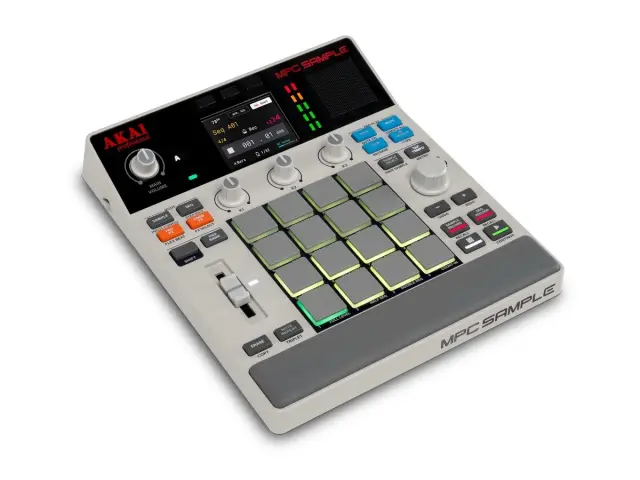
| MPC Sample | Sample Mode › CHOP button | Threshold, Regions 4/8/16, Manual (up to 16 slices) | Pads play the slices directly; Shift + Extract copies a slice to the next free pad |
| Roland SP-404MKII | Shift + START/END (marker screen) | Manual markers, AUTO MARK: Time Division 2–16, Level 1–10, Transient | VALUE › ASSIGN TO PAD, then pick the first pad |
MPC Live III, MPC One G2, MPC Key 37 G2, MPC XL
All current MPCs except the MPC Sample run the same MPC 3 software, so the seven steps above are exactly the same. The differences are hardware: the MPC Live III and the XL have phono inputs for sampling a turntable directly, and the Key 37 adds a dedicated Sample Edit button. Which one fits you? See our best Akai MPC guide and the MPC One G2 vs MPC Live III comparison.
Where to buyAkai MPC One G2
MPC Live II, MPC One and older MPCs
If your MPC runs MPC 3, it works the same way. On the MPC Live II, press Shift + Mute/Sample Edit to open Sample Edit. On MPC Beats (the free desktop software), the Chop Mode tab in Sample Edit has the same chop types; Akai has an official video on it. Upgrading? Read MPC Live II vs MPC Live III.
How to chop samples on the MPC Sample
The MPC Sample has its own, simpler Chop Mode. From the official user guide:
- In Sample Mode, select the pad with the sample and press CHOP. It chops between the sample’s start and end points with the current chop type.
- Turn K3 to pick the Chop Type: Threshold (Shift + K3 sets the threshold; higher means fewer slices), Regions 4, 8 or 16, or Manual (tap pad 1 to start playback and tap pads to add slices, up to 16).
- Each pad now plays a slice. K1 and K2 move the selected slice’s start and end; Shift + K1/K2 zooms.
- Shift + Split or Merge to fix slices; hold ERASE and tap a pad to remove one.
- Shift + Extract copies the selected slice to the next free pad as a new sample, without touching the original. Press CHOP again to exit.
One warning from the guide: slice edits cannot be undone with Undo/Redo.
Where to buyAkai MPC Sample

How to chop samples on the SP-404 MKII
Roland calls it marking and chopping. From the SP-404MKII reference manual:
- Press the pad with the sample, then hold SHIFT and press START/END to open the marker screen.
- Add markers: move the cursor with CTRL 1 and press MARK, or press pad 1 to play and tap the blinking pads 2–16 where you want each marker.
- Or let it do the work: press VALUE, choose AUTO MARK and pick Time Division (2–16 equal parts), Level (1–10) or Transient (Hard, Mid, Soft).
- Press VALUE, choose ASSIGN TO PAD, press the first pad for the chops and press VALUE again. The chops are laid out from that pad.
Picking between the small samplers? Our MPC Sample vs SP-404 MKII vs EP-133 comparison covers how each one handles sampling and chopping.
Where to buyRoland SP-404 MKII

Six chopping mistakes to avoid
- Chops that start late and lose the attack.
- Too many slices from a low threshold on a crackly record: raise the threshold or Min Time.
- No mute group, so long chops pile up into mud.
- Leaving the bass in every chop and fighting your 808 or bass line. Filter it.
- Saving before converting, and losing the slices you never sent to a track.
- Forgetting the record: write down artist, title and label, because a released beat needs the sample cleared. Our vinyl sampling guide explains master and composition rights.
Where to go from here
Chopping is the core skill of sample-based production, and the MPC makes it quick: Sample Edit, Chop, Convert. Once the chops are on pads, the beat is about your timing, your swing and what you choose to leave out. For the drums under your chops, layer a break with one-shots; for monitoring the low end of filtered samples, see the best studio monitors for a home studio and the best headphones for music production.
Royalty-free samplesSpliceNeed loops to practice chopping? Royalty-free soul, jazz and boom bap samples, licensed for commercial releases.
How to chop samples on an MPC: FAQ
How do you chop samples on an MPC?
Load the sample, press Menu and tap Sample Edit, switch the Trim/Chop tab to Chop, pick a chop type (Threshold, Regions, BPM or Manual) and fine-tune the slices. Then hold Shift, tap Convert, choose New drum track using slices and tap Do It. Each slice goes to its own pad, ready to play and sequence.
How do I chop samples on the MPC One or MPC One+?
The same way as on any MPC running MPC 3: press the Sample Edit button (or Menu › Sample Edit), tap Trim/Chop until it says Chop, choose Threshold, Regions, BPM or Manual, then Shift + Convert to send the slices to a new drum track. The MPC One G2 uses exactly the same screens.
How do I chop samples on the MPC Live 2?
Press Shift and Mute/Sample Edit to open Sample Edit, switch to Chop, choose the chop type and adjust the slices. Shift + Convert sends them to a new drum track. The Live II runs MPC 3, so the steps are the same as on the Live III.
How do I chop samples on the MPC Live 3?
Open Menu › Sample Edit, tap Trim/Chop so it says Chop, pick a chop type and fine-tune the slices by dragging the start and end markers. Hold Shift and tap Convert, choose New drum track using slices and tap Do It. That is the same workflow I use on my Live III.
How do I chop samples on the MPC Key 37?
The MPC Key 37 has a dedicated Sample Edit button. Press it, switch to Chop, pick Threshold, Regions, BPM or Manual, then Shift + Convert to put the slices on pads.
How do I chop samples on the MPC Sample?
Select the pad with the sample in Sample Mode and press CHOP. Turn K3 to pick Threshold, Regions 4, 8 or 16, or Manual, and use K1 and K2 to move each slice’s start and end. Each pad plays a slice. Hold Shift and press Extract to copy a slice to the next free pad as its own sample.
What is the best chop mode on the MPC?
Threshold for drum breaks and anything with clear hits; BPM or Regions for loops you want on the grid; Manual for soul and jazz samples where you choose the musical phrases yourself. Many producers start with Threshold or BPM and then fix the slices by hand.
Is chopping on the MPC destructive?
No. Akai calls Chop Mode non-destructive: the slices are markers on the original sample. Converting with New drum track using slices keeps it that way. Create New Samples with Crop Samples checked deletes the unused audio from the new samples, but the original stays in the project.
How do I save chopped samples on the MPC?
Convert the slices first (Shift + Convert), then save the whole project with Menu › Save › Project. That keeps the sample, the slice markers and the new drum track together. To keep a slice as its own file, convert with Create New Samples or use the Extract process.
How do I chop samples on the SP-404 MKII?
Select the sample’s pad, hold Shift and press START/END to open the marker screen. Press MARK to add markers, tap pads while it plays, or use AUTO MARK (Time Division, Level or Transient). Then press VALUE, pick ASSIGN TO PAD, choose the first pad and press VALUE again.
Sources
- Akai Professional: MPC Standalone OS user guide v3.4 (Drum Loops & Chop Mode; Sample Edit Mode › Chop Mode; Converting or Assigning Slices)
- Akai Professional: MPC Software v3.9 user guide (slice Motion, Link Slices)
- Akai support: convert your chopped samples into a drum program
- Akai Professional: MPC Sample user guide, Chop Mode
- Roland: SP-404MKII reference manual, marking and splitting samples (MARK, AUTO MARK)
- Roland: SP-404MKII reference manual, assigning a split sample to pads (CHOP)
GUIO Records is not affiliated with Akai Professional or Roland. Prices and products change; the buttons show the current price on Amazon.