How to Sample Vinyl: Turntable to MPC, FL Studio or Ableton (2026 Guide)
This article contains affiliate links. If you buy through them, GUIO Records may earn a small commission at no extra cost to you. As an Amazon Associate I earn from qualifying purchases.
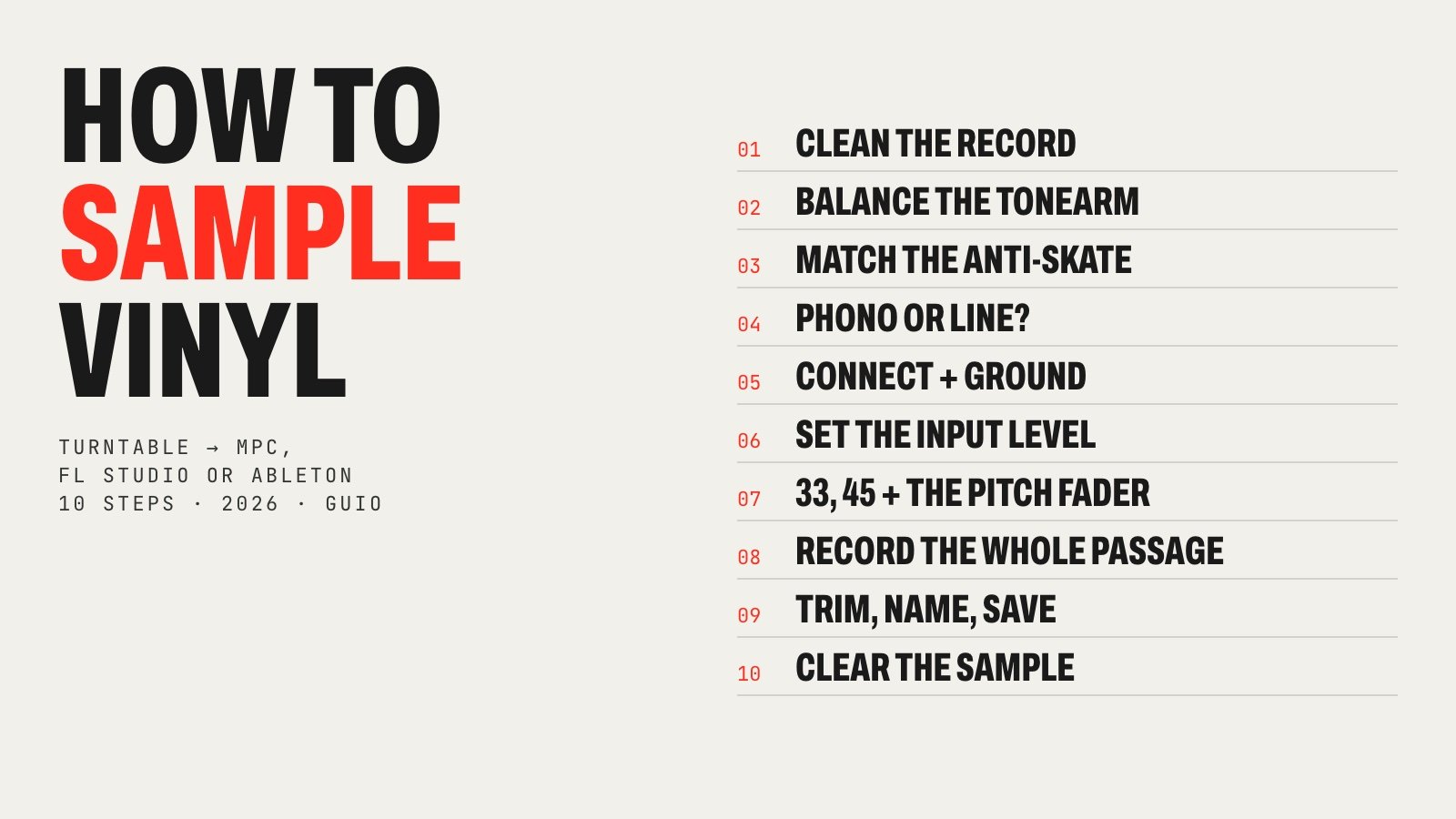
Sampling a record is where boom bap came from: a turntable, a sampler and a crate of dusty soul. The process is simple once you know it, but small mistakes (a tonearm set wrong, a turntable on the wrong input, levels in the red) ruin the sound before you even start chopping. Here is the whole thing in 10 steps, from a clean record to a sample you can actually release.
How this guide was made: I make my beats on an MPC Live III and work with samples every day, but I don’t own a turntable right now. The turntable setup comes from the manufacturers (Audio-Technica, Technics, Akai), the software steps from the official FL Studio and Ableton manuals, and the legal part from the court cases that set the rules. Sources are linked at the end.
What you need to sample vinyl
- A turntable with an adjustable tonearm (counterweight and anti-skate) and, ideally, a pitch fader. A direct-drive deck like the Technics SL-1200MK7 or Audio-Technica AT-LP120XUSB holds speed well.
- A phono stage: built into the turntable, the sampler, a DJ mixer or a separate phono preamp.
- Something to record into: an MPC or other sampler, or an audio interface and a DAW like FL Studio, Ableton Live or Logic.
- Closed headphones or monitors to hear what you are sampling.
- A carbon fiber record brush. Cheap, and it removes more noise than any plugin.
- Records. Used soul, jazz, funk and library records from thrift stores and record fairs are where most classic samples came from.
Choosing a sampler? Our guide to the best Akai MPC compares every current model, and the MPC Sample vs SP-404 MKII vs EP-133 comparison covers the small ones.
Where to buyAudio-Technica AT-LP120XUSB
Step 1. Clean the record
Every click and crackle you record becomes part of the sample, and it repeats every time the loop does. Some crackle is part of the sound, but dust is not character, it is noise.
- Brush before every pass with a carbon fiber brush, following the grooves while the record spins, and lift it off toward the edge.
- Wet-clean dirty used records with a record-cleaning solution or distilled water with a drop of surfactant and a microfiber cloth, along the grooves. Avoid tap water, household cleaners and alcohol on old records, and let the record dry completely before you play it.
- Brush the stylus too, from back to front, with a stylus brush. A ball of fluff on the needle dulls the treble.
- If one copy is beaten up, look for another pressing. A clean copy of a common record is often cheaper than hours of de-clicking.
Where to buyCarbon fiber record brush
Step 2. Balance the tonearm and set the tracking force
A tonearm that tracks too light skips and distorts on loud passages; too heavy and it wears records faster. Audio-Technica’s setup guide for the AT-LP120X turntables describes the standard method, and it works on most decks with a counterweight:
- Set the anti-skate dial to 0, take the stylus guard off and release the arm clip, holding the headshell so the needle does not drop.
- Turn the counterweight until the arm floats level on its own, not rising or falling.
- Without moving the weight, turn only the numbered gauge ring until 0 lines up with the mark on the arm.
- Now turn the weight and ring together until the ring shows the tracking force your cartridge maker recommends (2.0 grams for the AT-VM95E that comes on the AT-LP120XUSB). The Technics SL-1200MK7’s scale reads 0 to 4 grams directly.
A cheap digital stylus force gauge confirms the number in seconds, which helps on used turntables whose counterweight scale you cannot trust.

Step 3. Match the anti-skate
While a record plays, the arm is pulled toward the center. Anti-skate pushes back so the stylus sits evenly in the groove and both channels sound the same. The standard rule is to set the anti-skate dial to the same number as your tracking force (2.0 for 2.0 grams).
One exception matters for hip hop: Audio-Technica notes that if you do a lot of back-cueing, scratching or reverse play, you may want less anti-skate or none. For sampling, where the record plays forward, keep it matched.
Where to buyDigital stylus force gauge
Step 4. Phono vs line: does your gear need a phono preamp?
This is the step most beginners get wrong. A turntable cartridge puts out a phono signal of only a few millivolts (around 3 to 6 mV for a typical moving-magnet cartridge). Records are also cut with the RIAA curve, which cuts bass and boosts treble. A phono preamp does two jobs: it boosts the signal to line level (roughly 0.3 volts and up) and applies the opposite curve to restore the bass and treble.
- Phono into a line input: very quiet and thin. Turning the gain up adds hum and noise.
- Line into a phono input: far too loud, with boomy bass and distortion.
- If your turntable has a PHONO/LINE switch, it has a built-in preamp. The Audio-Technica AT-LP120XUSB is one; the Technics SL-1200MK7 is not, so it always needs a phono input or preamp.
Which connection do you need?
| Your gear | Inputs | How to connect a turntable |
|---|---|---|
| MPC Live III · MPC XL | Phono inputs (RCA) | Turntable straight in on phono. If the deck has a phono/line switch, set it to phono |
| MPC Live II | Phono inputs (RCA) + ¼" line, rear switch | Rear switch to phono, RCAs in, ground wire on the ground post |
| MPC One G2 · MPC Key 37 G2 | Line inputs only | Phono preamp or DJ mixer in between, or a deck with a built-in preamp set to line |
| MPC Sample · SP-404 MKII · EP-133 | Line inputs only | Same: phono preamp, DJ mixer or line output |
| Audio interface → FL Studio, Ableton, Logic | Line/instrument inputs | Phono preamp or mixer first; the interface mic preamp is not a phono preamp |
| USB turntable (e.g. AT-LP120XUSB) | USB to computer | Pick the turntable as the audio input in your DAW, or use its RCA outputs on line |
On an audio interface, do not use the mic preamp as a phono stage: it adds gain but not the RIAA curve. A DJ mixer with phono channels does the job and also lets you cue and scratch.
Where to buyPhono preamp for turntable
Step 5. Connect the turntable and the ground wire
- Turn everything down first: the sampler’s input level, monitors and headphones. Akai’s own sampling guide says to do this before making any connection, to avoid pops and feedback.
- Connect the RCA cables (red is right, white is left) to the input you chose in step 4.
- Connect the ground wire, the thin separate cable with a spade end, to the ground terminal of whatever has the phono stage: the preamp, the DJ mixer or the sampler. A missing ground is the most common cause of a low hum.
- On the MPC Live II, set the rear switch to phono. If your deck has its own phono/line switch, set it to match the input you are using.

Step 6. Set the input level
Play the loudest part of the record, usually the chorus or the full-band section, and raise the input level while you watch the meter.
- Aim for peaks around −6 dBFS. Vinyl clicks can spike higher than the music, so leave room.
- Never hit the red. Akai’s guide warns that a peaking meter means distortion or artifacts in the sample.
- On an MPC, the level knob is Rec Vol on the MPC Live, Live II and One (Rec Gain on the MPC X). In a DAW, set the gain on your interface or preamp, not the track fader.
- Record at 24-bit and the sample rate of your project (44.1 or 48 kHz). There is no need to record hot at 24-bit; you can normalize the sample later.
Step 7. Choose the speed: 33, 45 and the pitch fader
Before you record, decide whether you want the record as it is or already pitched.
- The clean way: correct speed, pitch fader at zero (or quartz lock on). You keep the original tempo and key, and the sampler can repitch or time-stretch it later without guesswork.
- The 33-at-45 trick: on the E-mu SP-1200, with only seconds of sampling time, late-’80s producers sampled 33 rpm records at 45 rpm and pitched them back down in the sampler to fit more audio, which also changed the sound. Playing at 45 instead of 33⅓ is 35% faster, a little over five semitones higher. Today memory is not a problem, but some producers still do it for the feel.
- Pitching on the deck: the pitch fader (±8% or ±16% on the Technics SL-1200MK7) changes tempo and key together, like a sampler’s repitch. Useful to land a loop near your tempo before you sample.
If you pitch on purpose, write the setting down (for example “45 rpm, +3%”) so you can find the sound again.
Where to buyTechnics SL-1200MK7
Step 8. Record the whole passage
Record more than you need: start a bar or two before the section and let it run a little after. A clean start, the natural tail of the last note and the bars around the loop give you options when you chop. Many producers record a whole side, or the full song, and pick the moments later.
Here is how to do it in each setup.
How to sample vinyl on an MPC
Akai’s standalone sampling guide for the MPC Live, Live II, One and X follows these steps (menus vary slightly with each MPC software version):
- Press Menu and open the Sampler.
- Set the Input Source in the top left to the input pair your turntable is on (1,2 on most setups).
- Play the record and set the level with the input knob, watching the meter.
- Choose how you want to record: Sample (one recording), Slice (tap Slice+ to drop markers while it records), Pad Hold or Pad Tap.
- Turn Monitor on if you want to hear the turntable through the MPC.
- Tap Arm. Recording starts when the audio passes the Threshold, or when you tap Record. Tap Stop when you are done.
On the MPC Sample, Akai’s guide uses Sample Record mode: pick Rear as the source (both rear inputs in stereo), set Length and Threshold, and tap a pad to record. Remember it needs a phono preamp in front, as do the MPC One G2 and the MPC Key 37 G2. The MPC Live III takes the turntable straight in; the MPC One G2 vs MPC Live III comparison explains what else separates them.
How to sample vinyl in FL Studio
- Connect the turntable through a phono preamp (or on line) to your audio interface and select its ASIO driver in FL Studio’s audio settings. Image-Line’s manual is clear: you must use an ASIO driver to record audio.
- In the Mixer, pick an insert track and choose your interface input in the INPUT menu above the effect slots.
- Load Edison in an effect slot of that track and press its record button. It records what comes into the track, before the fader.
- Play the record, stop Edison when you are done, trim the start and end, and drag the sample into the Channel Rack, a Sampler channel or Slicex.
How to sample vinyl in Ableton Live
- Create an audio track. In its I/O section, set Audio From to Ext. In and choose the input pair (for example 1/2) your turntable is on.
- Set Monitor to Auto or In so you hear the record, and arm the track.
- Record in Session view (a clip slot) or Arrangement view, and stop when the passage is done.
- Drag the clip into Simpler or Sampler to play it from pads or keys and start chopping.
In Logic, Pro Tools or any other DAW it is the same idea: an audio track, the right input, arm and record.

Step 9. Trim, name and save
- Trim the silence at the start and end, and add a very short fade if the start clicks. Keep the original long recording too.
- Name it properly: artist, record, side and track, plus tempo and key if you know them. “Sample 14” means nothing in six months, and you will need the record’s details to clear it.
- Save the project before you start chopping. On an MPC, save the whole project, not just the sequence.
- Keep a small log or photo of the record cover and label: label, year and catalog number make clearance much easier.
Now the fun part: chopping. If you want to hear what a master did with a crate of records, the samples behind J Dilla’s Donuts are a good place to start.
Step 10. Is it legal to sample vinyl? Clear the sample
Owning the record lets you play it, not release music made from it. A sample of a record uses two copyrights:
- The master (the sound recording), usually owned by the label.
- The composition (the song itself), owned by the songwriters and their publishers.
To release a beat with a sample, you normally need a license for both. If you replay the part yourself (an interpolation), you only need the composition license.
- There is no safe number of seconds. In Bridgeport Music v. Dimension Films (2005), the Sixth Circuit court of appeals said “get a license or do not sample”. In VMG Salsoul v. Ciccone (2016), the Ninth Circuit found a 0.23-second horn hit in Madonna’s “Vogue” too small to infringe. Courts disagree, so you cannot rely on short samples being safe.
- Practice and private beats are not where problems start; releases, sync and big placements are. If a beat with an uncleared sample gets picked up, expect to clear it or replace it.
- Safer options: sample from licensed sample libraries, replay the part, or work with the rights holders from the start.
This is general information for producers, not legal advice. For a real release, talk to a music lawyer or a sample clearance service.
Six mistakes that ruin vinyl samples
- A turntable on the wrong input: phono into line (quiet and noisy) or line into phono (distorted).
- No ground wire, and a hum under every loop.
- Levels in the red on the loudest hit or a click.
- A dusty record or stylus, and crackle you did not choose.
- Sampling only the exact loop, with no room to move the start or keep the tail.
- Not writing down the record, and no way to clear it later.
Where to go from here
A good sample starts with a clean signal: a balanced tonearm, the right phono stage and honest levels. After that, it is all about what you hear in the record. If you are picking a machine for sampling vinyl directly, the MPC Live III is the current MPC with phono inputs built in; if you already own an MPC Live II, it has them too. For listening while you dig, see the best headphones for music production and the best studio monitors for a home studio.
How to sample vinyl: FAQ
What is the best way to sample vinyl?
Clean the record, set the tonearm’s tracking force and anti-skate, send the turntable through a phono preamp (or into a phono input), set peaks around −6 dBFS and record the whole passage at 24-bit into your sampler or DAW. Then trim, name and save it before you chop.
Can you plug a turntable straight into an MPC?
Only into an MPC with phono inputs. The MPC Live III and MPC XL have them, and so did the MPC Live II. The MPC One G2, MPC Key 37 G2 and MPC Sample have line inputs only, so you need a phono preamp, a DJ mixer or a turntable with a built-in preamp switched to line.
Do I need a phono preamp to sample vinyl?
Yes, somewhere in the chain. A cartridge puts out only a few millivolts and the record is cut with the RIAA curve, so the signal needs a phono stage to boost it and restore the bass and treble. It can be built into the turntable, the sampler, a DJ mixer or a separate box.
Should my turntable be set to phono or line?
Set it to phono if you plug it into a phono input (MPC Live III, a DJ mixer’s phono channel or a phono preamp). Set it to line if you plug it into a line input. Line into phono sounds loud and distorted; phono into line sounds very quiet and thin.
How do I sample vinyl in FL Studio?
Connect the turntable through a phono preamp to your audio interface, pick that input in the Mixer INPUT menu of an insert track, load Edison on that track, arm it and press play on the record. FL Studio needs an ASIO driver to record. Then trim the sample in Edison and drag it into a channel.
How do I sample vinyl in Ableton?
Create an audio track, set Audio From to Ext. In and the input pair your turntable is on, set Monitor to Auto or In, arm the track and record in Session or Arrangement view. Then drop the clip into Simpler or Sampler to play and chop it.
Should I sample at 33 or 45 rpm?
Sample at the record’s real speed for the cleanest result. Sampling a 33 rpm record at 45 rpm and pitching it down in the sampler is an old SP-1200 trick to save sampling time; today some producers still use it for the sound, but you don’t need it for memory.
Why does my turntable hum when I sample?
Usually the ground wire is not connected, or the turntable is on a line input with no phono stage and you turned the gain all the way up. Connect the ground wire to the preamp, mixer or sampler and use the correct phono or line input.
Is it legal to sample vinyl?
Recording your own record for practice is one thing; releasing a beat with the sample is another. A released sample uses two copyrights, the master recording and the composition, and both usually need a license. There is no safe number of seconds. This is general information, not legal advice.
Sources
- Akai Professional: MPC standalone Sampler overview (levels, inputs, Arm, Threshold)
- Akai Professional: MPC Sample user guide, Sample Record mode
- Audio-Technica: setting up the AT-LP120X turntables (counterweight, tracking force, anti-skate)
- Audio-Technica: AT-LP120XUSB (switchable phono preamp, AT-VM95E cartridge)
- Technics: SL-1200MK7 specifications (pitch range, stylus pressure scale)
- Wikipedia: Phono input (phono level, RIAA equalization)
- Image-Line: FL Studio manual, Edison recording
- Ableton: Live 12 manual, Routing and I/O
- Wikipedia: E-mu SP-1200 (sampling 33 rpm records at 45 rpm)
- Wikipedia: Bridgeport Music, Inc. v. Dimension Films
- Venable LLP: VMG Salsoul v. Madonna Louise Ciccone (2016)
- Rolling Stone: how to clean your vinyl records
GUIO Records is not affiliated with any of the brands mentioned. Prices and products change; the buttons show the current price on Amazon.